

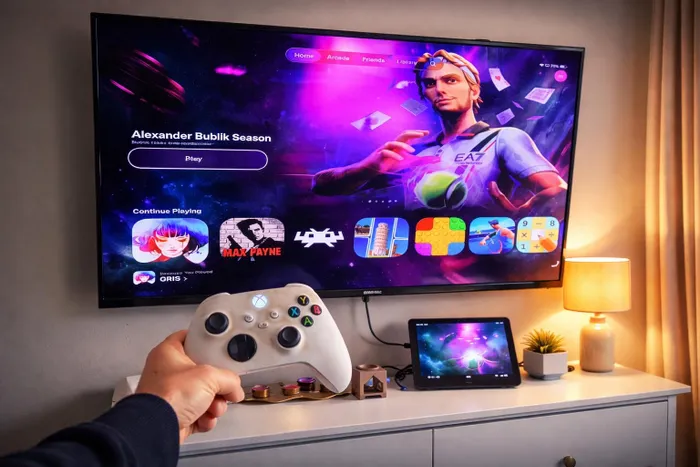
You can easily transform your TV into a gaming console with Apple’s cheapest iPad, Bluetooth controller,for a seamless gaming experience with stunning games like Gris and classic titles from old consoles if you’re in the mood for a bit of tinkering. Picture: Michael Sherman/IOL
Image: Picture: Michael Sherman/IOL
When it comes to any kind of technology, I love to tinker, and that’s why I was like a kid at Christmas when I discovered that you can turn your TV into a gaming station with Apple’s cheapest iPad.
With the cheap USB-C hub I bought, I decided to try outputting the display of my A16 iPad with the HDMI port while also charging the device.
And to my surprise, it just worked.
Add in a Bluetooth game controller, and you’re ready to go.
Granted, you won’t be able to run the very best AAA games on this budget iPad, I was still able to run the visually stunning game Gris.
Since this game came out in 2018, it’s not too graphically demanding, and through the iPad, it ran perfectly without any lag. You can also have access to a host of games on the App Store, which will be the most seamless experience.
The Apple Arcade game interface when you connect a controller is also a pleasure to navigate. It means you can control your whole gaming experience with just the controller, with the exception of the volume, which you can adjust with your TV remote.
I also tried the classic game Max Payne. Though it ran just fine, there was a sound issue that meant it didn’t output sound to the TV. I got around this pretty easily by connecting my Bluetooth earphones, and I was quickly back in business and flying across corners with the grilled detective in slow motion/bullet time as I took out all the bad guys.
The iPad can even run all the old console systems like Sega, PlayStation one and two, and even the classic Super Nintendo. With the RetroArch App, you then just have to find some suitable ROMs (game files), and with a quick YouTube tutorial, you can run any of these old systems.
I found a 1200 in 1 ROM file, and in a flash, I was off to rescue Princess Peach in Super Mario Bros. 2, then it was off destroying friendly-looking monsters in Bomber Man.
The same would be true for just about any classic game you can think of. And the fact that it’s so easy and convenient makes firing up any basic game of your choice an absolute joy without forking out for the latest Xbox or PlayStation console.